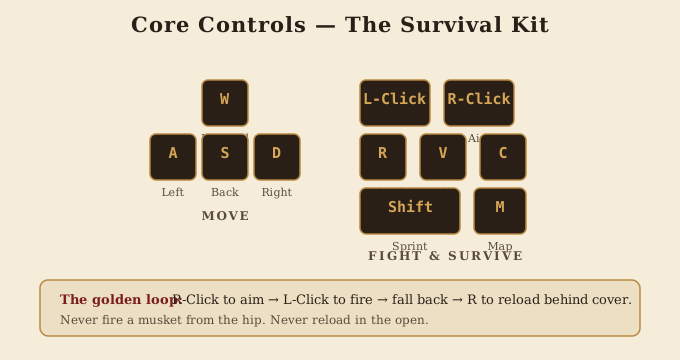
Default Bindings
These are the defaults you'll have on first launch. They can be remapped in Settings → Controls. Veterans tend to leave them as-is — they're well-designed.
Movement
Walk forwardW
Walk backS
Strafe leftA
Strafe rightD
SprintShift
JumpSpace
Crouch (toggle)C
Prone (toggle)Z
Vault / climbSpace
Combat
FireLMB
Aim down sightsRMB
ReloadR
Melee / bayonetV
ParryF
Hold breath (steady aim)Shift (while ADS)
Cancel reloadShift (sprint)
Weapons
Primary (musket / carbine)1
Secondary (pistol)2
Melee (bayonet / sabre / cutlass)3
Quick swap last weaponQ
Drop weaponG
Information
Open large mapM
Toggle minimap zoomN
ScoreboardTab
Show class panelX
Ping objectiveMouse 3
Communication
Proximity voice chatT (hold)
Team voice chatY (hold)
Text chat (all)Enter
Text chat (team)U
Quick command wheelB
Mount (Cavalry)
Mount / dismount horseE
Spur horse (sprint)Shift
Trot / canter toggleX
Sabre swing (mounted)LMB
Cannon (Cannoneer)
Mount / dismount cannonE
Switch ammo (round / grape)4 / 5
Adjust elevation↑ ↓
Push gun (reposition)W while interacting
Ship (Sailor)
Interact with stationE
Steer (helm)A / D
Raise / lower sailsW / S
Fire broadside (helm)LMB
Cycle gun deck (helm)Tab
Recommended Rebinds
Most defaults are good, but a few tweaks veteran players make:
- Bayonet on Mouse 4 — if your mouse has a thumb button, putting melee there means you never have to take a finger off WASD.
- Crouch on toggle, not hold — far less wrist fatigue across long matches.
- Voice chat as toggle — easier than holding T through a long callout.
- Map on Caps Lock — keeps your left hand free of awkward stretches.
Mouse & Sensitivity
Redcoats.io is a slow-aim game compared to modern hero shooters. Musket shots reward steady, deliberate aim, not flick mechanics. Most veterans run sensitivity well below their CS / Valorant settings.
| Setting | Recommended Range | Note |
|---|---|---|
| DPI | 800–1600 | Standard FPS range. |
| In-game sensitivity | 0.4–0.8 | Lower than most FPS — favours precision. |
| ADS multiplier | 0.7–0.85 | Slow your aim further when sighted. |
| Polling rate | 1000Hz | If supported. |
Voice Chat Etiquette
Redcoats.io rewards coordination, and proximity voice (T) is how teams of strangers work together. A few rules:
- Be brief. "Cav left!" beats "I see a cavalryman approaching from the western flank."
- Be useful. Report positions and intents, not opinions.
- Avoid music or noise — the proximity channel is essentially battlefield comms.
- If you don't know what to say, don't. Silence is fine.
What to Read Next
- Beginner Guide — if you're just starting out.
- Musketeer Guide — apply these controls to the main class.
- Fort Capture — where voice chat matters most.